
CMZ Safa: Athan Clock for TV, Prayer Times & Qur’an
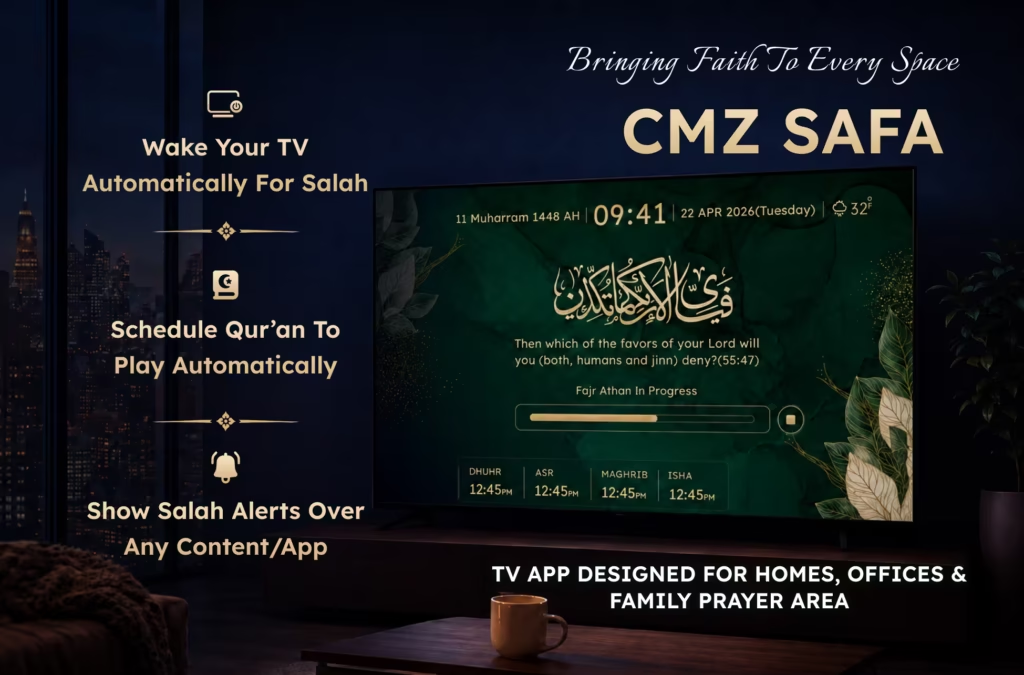
CMZ Safa is CMZ’s smart Athan clock for TV, designed for homes and families. It displays daily prayer times, Athan and Iqamah reminders over any app/content, and scheduled Qur’an recitation on supported TVs like Android TV, Google TV, Fire TV, LG TV and more. Families can follow a selected masjid’s timetable or calculate prayer times using their location.
The television is often the most visible screen in a home. CMZ Safa uses that shared screen to keep Salah visible without turning the TV into a dedicated prayer display. Specifically designed to strengthen the deen and connection between the community and their Masajids, while families can continue using their television normally and receive prayer information when it matters.
Instead of relying only on personal phone notifications, CMZ Safa creates shared prayer awareness in the living room, home office, or family prayer area.
CMZ Safa at a Glance
Question | Short answer |
What is CMZ Safa? | A personal Islamic prayer-time display made for home, offices, and shared prayer areas. |
What can it show? | Prayer times, dates (Georgian and Hijri), display over any app/content for prayer reminders, Scheduled Quran, and configured Islamic content. |
Can it play the Athan? | Yes. Users can choose which prayers play the Athan and select an available voice. |
Does it support Iqamah alerts? | Yes. Athan and Iqamah preferences can be configured separately. |
Can it follow my masjid? | Yes, when the masjid is available in the CMZ system, users can select their masjid to show its timings. |
Can it calculate prayer times independently? | Yes. Users can select a location, calculation method, Asr method, and relevant adjustments. |
Can it play Qur’an? | Yes. A Surah or Juz can be played immediately or scheduled around a time of Salah. |
Is it only for prayer rooms? | No. CMZ Safa can be used in a living room, home office, prayer corner, or shared family space. For masjids, CMZ Masjid TV is the dedicated solution. |
Is it the same as CMZ Masjid TV? | No. CMZ Safa is for personal use; CMZ Masjid TV is designed for public masjid displays. |
Why Use an Athan Clock on Your TV?
Most Athan and prayer-time apps are designed for one person’s phone. They are useful outside the home, but a notification can be silenced, dismissed, or missed. It may also reach only the phone’s owner.
CMZ Safa turns a compatible television into a smart Athan clock and places prayer information on a screen the household already shares. A visible countdown can show that Maghrib is approaching, an overlay can appear while other content is playing, and scheduled Qur’an recitation can support a consistent family routine, keeping one closer to its deen.
CMZ Safa may be especially useful for:
- Families that want prayer times visible throughout the day
- Parents encouraging consistent Salah habits with children
- People who work from home and lose track of prayer times
- Households that want to follow their local masjid’s timetable
- Muslims who live outside the range of an audible Athan
- Older relatives who prefer a large, readable display
- Anyone creating a modern Islamic prayer corner at home
Where Can You Use CMZ Safa?
CMZ Safa is intended for compatible TV platforms and TV browsers. Availability and individual features can vary by device, operating system, and power settings.
Platform | Access |
Android TV and Google TV | Download CMZ Safa from the TV app store |
Amazon Fire TV | Download CMZ Safa from the Amazon Appstore |
LG TV | Open CMZ Safa through the TV browser |
Samsung TV | Open CMZ Safa through a compatible TV browser |
Desktop or laptop browser | Open the web-based display when a TV browser is unavailable. |
Before installation, check the current CMZ Safa product page for supported devices and setup guidance.
How CMZ Safa Works
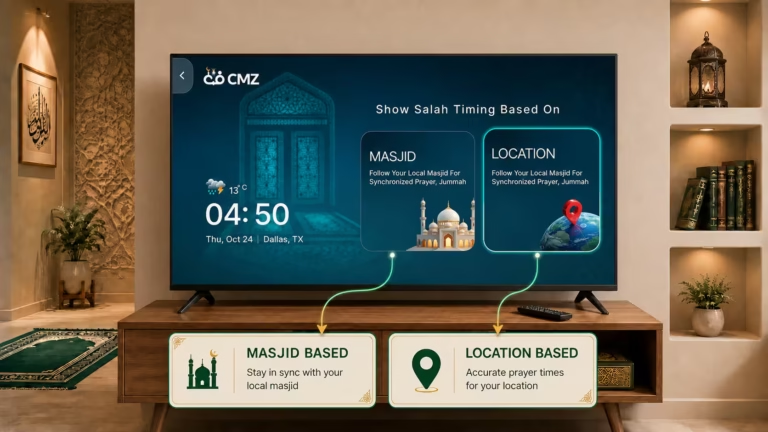
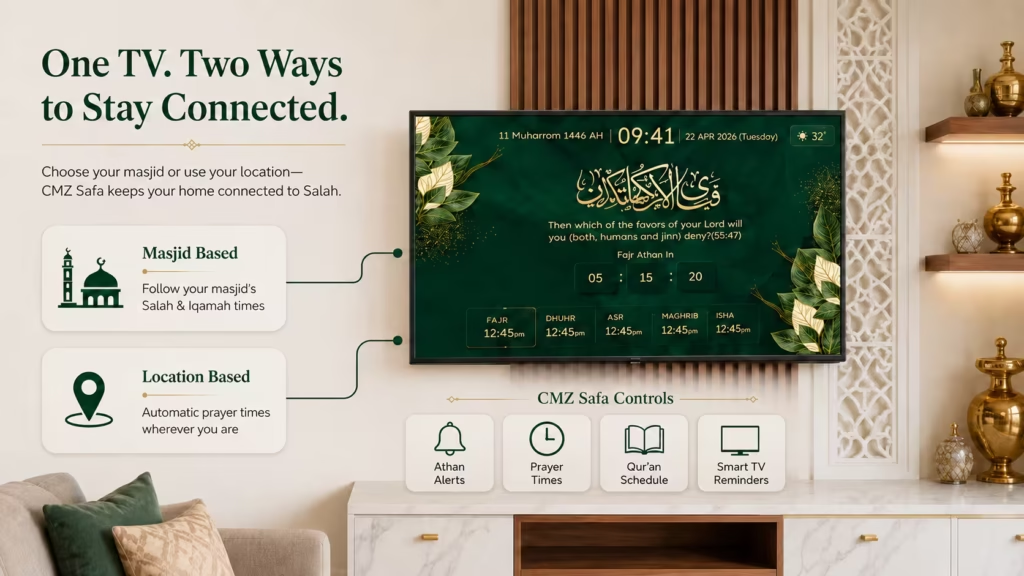
CMZ Safa provides two ways to configure prayer times: follow a selected masjid or calculate timings from a location.
Option 1: Follow a Selected Masjid
This option is best for a household that wants to remain aligned with a particular masjid’s Athan, Iqamah and Jumu’ah information.
- Open the CMZ TV app and choose Personal Display.
- Select Masjid.
- Search for and choose the preferred masjid.
- Select a theme, color style, layout and time format.
- Choose which prayers should play the Athan and select an available voice.
- Configure the Iqamah alert preferences.
- Launch the personal prayer display.
Following a masjid is helpful when the family wants to prepare for local congregation times rather than rely only on calculated prayer-start times.
Option 2: Use Location-Based Prayer Times
This option is suitable when a local masjid is unavailable or the household wants independent control over its prayer calculations.
- Open the CMZ TV app and choose Personal Display.
- Select Location.
- Choose the relevant prayer calculation method, such as ISNA, Karachi, Umm al-Qura or Egyptian.
- Select the preferred Asr juristic method.
- Review prayer offsets, high-latitude handling and Hijri date adjustment where relevant.
- Choose the display theme, colors, layout and time format.
- Configure Athan and Iqamah playback preferences.
- Launch the prayer-time display.
Users should select calculation settings that reflect their location and trusted local practice.
Core Features of CMZ Safa
1. Prayer Times on TV
CMZ Safa presents the five daily prayer times in a layout designed to be seen from across a room. This gives the household a shared reference without requiring each person to check a separate phone or printed timetable.
2. Next-Salah Countdown
The display can highlight the upcoming prayer and show how much time remains. This helps family members finish an activity, make wudu and prepare for Salah without calculating the remaining time themselves.
3. Customizable Athan Alerts
Users can choose which prayers should play an audible Athan. For example, a household might enable the Athan for Fajr, Maghrib and Isha while using visual reminders during working hours.
Available Athan voice options allow the experience to be personalized further.
4. Separate Iqamah Alerts
Athan marks the beginning of a prayer time, while Iqamah indicates that congregational prayer is about to begin. CMZ Safa can configure these alerts separately, helping a family distinguish between the two moments and establish its own home prayer routine.
5. Friday and Jumu’ah Support
Friday prayer information does not always fit a standard Dhuhr display. CMZ Safa supports Jumu’ah-related presentation so that Friday information can be shown appropriately. The exact details depend on the selected masjid or configured timing source.
6. Smart Prayer Overlay
A prayer overlay can appear while someone is using another TV app or watching content. For example, an “Asr in 10 minutes” reminder can reach the viewer without requiring them to open CMZ Safa manually.
This is particularly useful in living rooms and home offices where attention is already directed toward the television.
7. Auto Wake and Auto Sleep
On supported devices and configurations, Auto Wake can activate the TV experience around selected Athan or Iqamah times. Auto Sleep can help return the screen to its previous state or power behavior afterward.
Performance may depend on the connected device, background permissions, energy-saving settings and HDMI-CEC. Manufacturers may use names such as Anynet+, BRAVIA Sync, Simplink, VIERA Link or EasyLink for HDMI-CEC controls.
8. Scheduled Qur’an Playback
Users can choose a Surah or Juz, select a reciter and play it immediately or schedule it. A schedule can be connected to a prayer—for example, beginning several minutes after Fajr Athan or after Maghrib Iqamah—or set for a custom time.
Possible routines include:
- Scheduling Surah Al-Kahf on Friday
- Playing Qur’an after Fajr
- Starting a recitation before bedtime
- Creating a weekly family listening routine
This makes Qur’an playback part of a repeatable household routine instead of depending on someone remembering to start it each time.
9. Themes, Colors and Layouts
Because the display becomes part of the room, CMZ Safa allows users to adjust themes, colors, layouts and time formats. A suitable layout should keep the next Salah readable at the household’s normal viewing distance without crowding the screen.
10. Time, Date and Calculation Preferences
Households can choose relevant time and calendar preferences, including 12- or 24-hour time and Hijri date adjustment. Location-based setup also provides prayer-calculation and timing-offset controls.
Best CMZ Safa Setup by Need
Household need | Recommended setup |
Follow local congregation timings | Select a listed masjid and enable the required Iqamah alerts. |
Use independently calculated timings | Choose location-based setup with the appropriate calculation and Asr methods. |
Build a family prayer routine | Keep the next-Salah countdown visible and enable selected Athan and Iqamah alerts. |
Avoid missing Salah while watching TV | Enable Smart Prayer Overlay. |
Establish regular Qur’an listening | Schedule a Surah or Juz around a Salah or custom time. |
Improve visibility for older relatives | Use a high-contrast theme with a clear, large-text layout. |
Create a home prayer corner | Use a calm layout showing the next prayer, countdown and essential date information. |
Everyday Uses for CMZ Safa
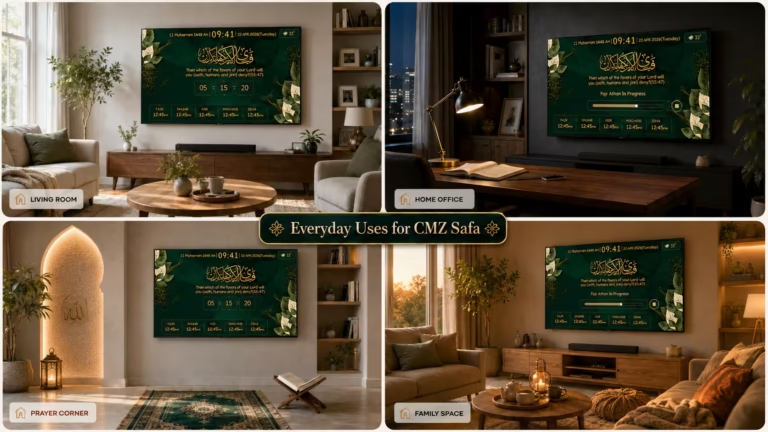
Family Living Room
The TV can show that Maghrib is approaching while the family finishes dinner or watches a program. The countdown gives everyone time to prepare, and the selected Athan or reminder marks the transition toward Salah.
Home Office
Meetings and focused work can make it easy to lose track of time. A visible prayer reminder or screen overlay provides a stronger shared cue than another notification among many on a phone.
Islamic Prayer Corner
A nearby television can provide changing information such as prayer times and countdowns, while prayer mats, Qur’ans and storage form the physical prayer space.
Home Following a Local Masjid
Selecting a listed masjid allows the family to view prayer information from the same source it uses when planning to attend congregational Salah.
Home Far from a Mosque
Where the public Athan cannot be heard, CMZ Safa can provide an audible or visual reminder based on the household’s selected settings.
CMZ Safa vs. a Standard Athan Mobile App
Standard mobile prayer app | CMZ Safa |
Primarily designed for one user | Designed for a shared household screen |
Requires someone to check a phone | Keeps prayer information visible in the room |
Notifications may be dismissed or buried | Provides large-screen reminders and supported overlays |
Small personal display | Readable from across a living space |
Follows the phone owner’s routine | Can support a family-wide prayer routine |
Best suited to use on the move | Built around a home TV experience |
A mobile app remains useful while traveling, at work or away from home. CMZ Safa serves a different purpose: maintaining a visible, shared prayer presence inside the home.
CMZ Safa vs. Other Athan Clocks for TV
People searching for the best Athan clock for TV may encounter CMZ Safa, Masjidal Athan+ TV, Masjidbox Home and MAWAQIT for TV. Each can bring Islamic information to a larger screen, but their priorities differ. The following summary is based on publicly described features at the time of publication. Users should verify current device support, pricing and capabilities on each provider’s official website.
Solution | Publicly described focus | May suit users who want |
CMZ Safa | Masjid-based or location-calculated prayer times, Athan and Iqamah preferences, smart reminders, supported Auto Wake behavior, scheduled Qur’an and visual customization | A configurable, prayer-centered home TV routine |
Masjidal Athan+ TV | Prayer timings, Athan, Qur’an, Islamic radio and rotating Islamic artwork | An Athan-clock experience with a strong Islamic-art focus |
Masjidbox Home | Mosque prayer times, Athan notifications, mosque video and Qur’an listening | A home display centered on following mosque content and video |
MAWAQIT for TV | Mosque-connected prayer times, Iqamah information, reminders and Islamic content | A TV display connected to the MAWAQIT mosque ecosystem |
Muslim Pro or Athan mobile apps | Mobile-first prayer times, Qur’an and personal Islamic utilities | A portable tool used mainly on a phone |
Sources: Masjidal Athan+ TV, Masjidbox Home and MAWAQIT.
The important question is not simply which product can display prayer times. A household should consider whether it wants independent location calculations, direct connection to a mosque, scheduled Qur’an, TV overlays, Islamic artwork, mosque videos or a mobile-first experience.
For detailed product decisions, separate comparisons such as CMZ Safa vs. Masjidal, CMZ Safa vs. Masjidbox Home and CMZ Safa vs. MAWAQIT should be published as dedicated articles and linked from this guide.
CMZ Safa vs. CMZ Masjid TV
Both are part of the wider ConnectMazjid platform, but they are designed for different environments.
CMZ Safa | CMZ Masjid TV |
Built for individuals and families | Built for masjids and Islamic organizations |
Used in homes, prayer corners and home offices | Used on public-facing screens inside a masjid |
Focuses on personal reminders and household routines | Focuses on congregational information and masjid communication |
Can follow a masjid or calculate times by location | Managed through the masjid’s administrative setup |
Provides personal control over Athan, Iqamah and display preferences | Provides organization-level control over screens, announcements, flyers and congregation-facing information |
The simplest distinction is: CMZ Safa helps a household prepare for prayer, while CMZ Masjid TV helps a masjid communicate with its congregation.
How to Get the Best Experience
Choose the Right Timing Source
Follow a listed masjid when alignment with local congregation times matters most. Use location-based calculation when independent control is more important or a suitable masjid is unavailable.
Configure Alerts Intentionally
Select Athan and Iqamah alerts according to sleeping hours, work routines and family preferences. Not every household needs every sound enabled for every prayer.
Prioritize Readability
Choose a layout that remains clear at the normal viewing distance. The next prayer and remaining time should be understandable at a glance.
Review TV Power Settings
If Auto Wake or background behavior is enabled, review the device’s energy-saving restrictions, background permissions and HDMI-CEC settings.
Begin with One Routine
Start by keeping prayer times visible or scheduling Qur’an after one prayer. Once the family is comfortable with that routine, add more reminders or scheduled content.
CMZ Safa displays prayer times and Islamic content on a home television. It supports next-prayer information, countdowns, selected Athan and Iqamah alerts, reminders, scheduled Qur’an and customizable display settings.
Choose location-based setup. Prayer times can be calculated using the selected location, calculation method, Asr juristic method, and relevant timing adjustments, or you can also invite your masjid to the CMZ Platform.
Yes. Users can select which prayers should have an audible Athan and choose from the available Athan voices.
Yes. Users can select a Surah or Juz for immediate playback or create a scheduled routine based on a Salah or custom time.
CMZ Safa can be used through supported TV platforms such as Android TV, Google TV, Fire TV, LG TV, and browser-based options. Check the current CMZ Safa page before installation because availability and features can vary by device.
Not necessarily. Mobile apps are valuable away from home. CMZ Safa complements them by providing a shared prayer-time experience on the household TV.
It may be considered an alternative for households comparing prayer-time TV solutions. The better choice depends on whether the household prioritizes CMZ Safa’s timing controls, Quran Scheduler, auto-wake/sleep feature, overlay over other apps, or Masjidal’s Islamic-art experience, or Masjidbox Home’s video and content connection.
A basic Athan clock typically shows prayer times and plays the Athan. CMZ Safa adds separate Iqamah settings, smart TV overlays, masjid or location-based timings, scheduled Qur’an and customizable TV layouts.
Search for CMZ in the app store on a supported Android TV, Google TV or Fire TV. On supported browser-based televisions, open CMZ Safa through the TV browser from https://cmzapp.com/tv.
Make the Most Visible Screen in Your Home More Meaningful
When prayer times remain inside a personal phone, they can be easy for the rest of the household to overlook. A shared display makes the next Salah, countdown and selected reminders part of the home’s everyday environment.
CMZ Safa goes beyond a basic Athan clock for TV by bringing together prayer times, customizable Athan and Iqamah alerts, smart reminders, scheduled Qur’an and flexible visual settings. It does not turn the home into a public prayer hall or prevent the TV from being used normally. It helps the household pause, remember and reconnect throughout the day.

Ready to bring prayer times and Islamic content to your television? Get started with CMZ Safa. No excuse to neglect or miss a prayer with the athan for each of the five daily prayers!