
Mosque Management Software: 3 Simple Ways to Keep Your App, Website & TV Displays in Sync
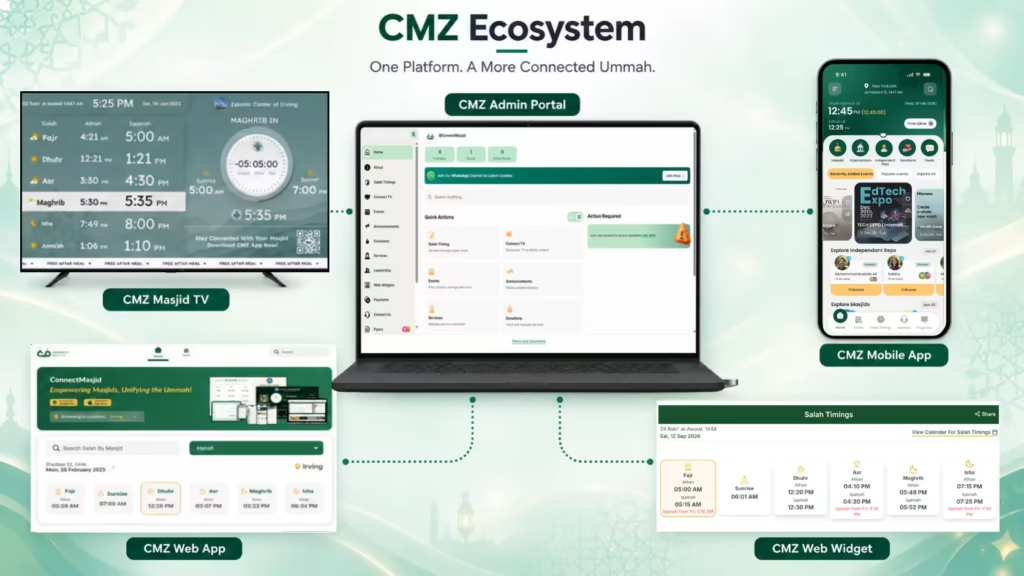
CMZ mosque management software gives masjid administrators one central place to manage prayer times, Iqamah schedules, Jumu’ah information, events, announcements, flyers, and other community content. Instead of updating your mobile app, website, and Whatsapp channels separately, administrators can manage supported information through the CMZ Admin Portal and keep connected CMZ experiences aligned.
Why Managing Multiple Masjid Platforms Gets Complicated
A masjid’s digital presence can spread across several places.
Someone checks Salah times on the mobile app. Another person visits the website. People inside the masjid see the information on a TV display.
For the community, that’s convenient.
For the administrator managing all of it, it can become a lot of work.
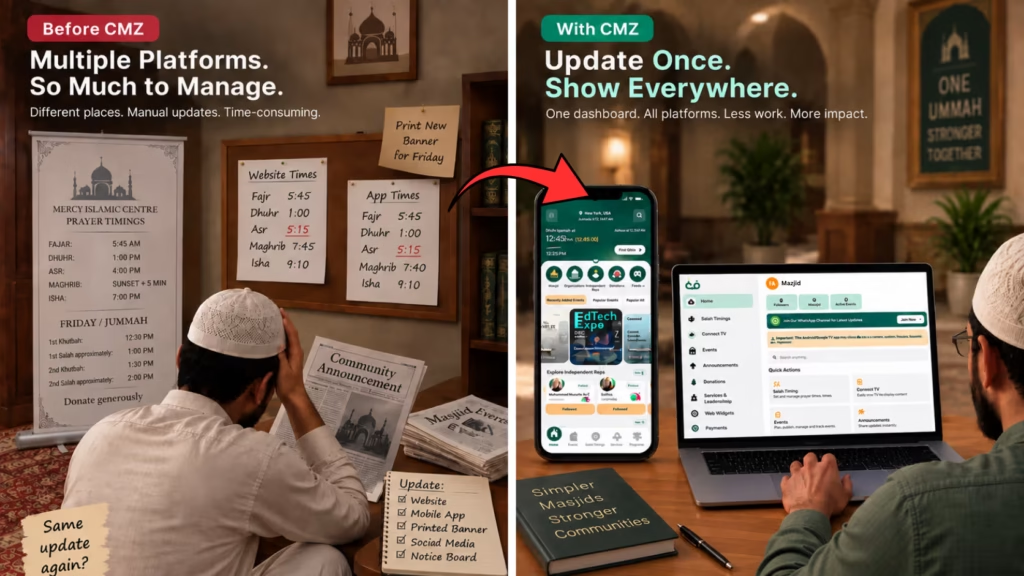
A small change to an Iqamah time may mean checking several different places to make sure the updated information is reflected everywhere it needs to be.
And when one update gets missed, the problem becomes bigger than extra work.
The website might show one time while the TV shows another.
That is where centralized mosque management software can make a real difference.
How CMZ Keeps Your Masjid Information Connected
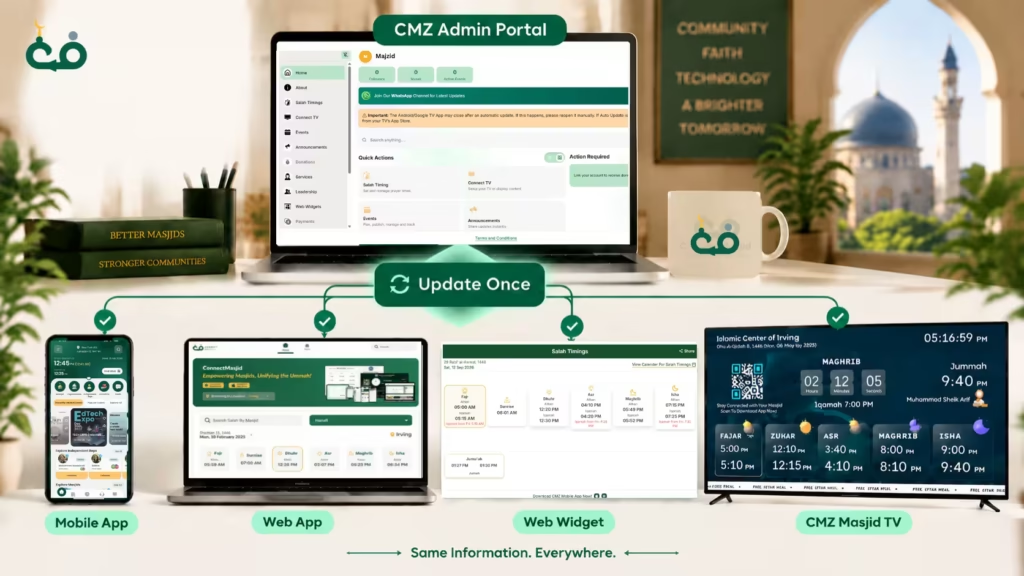
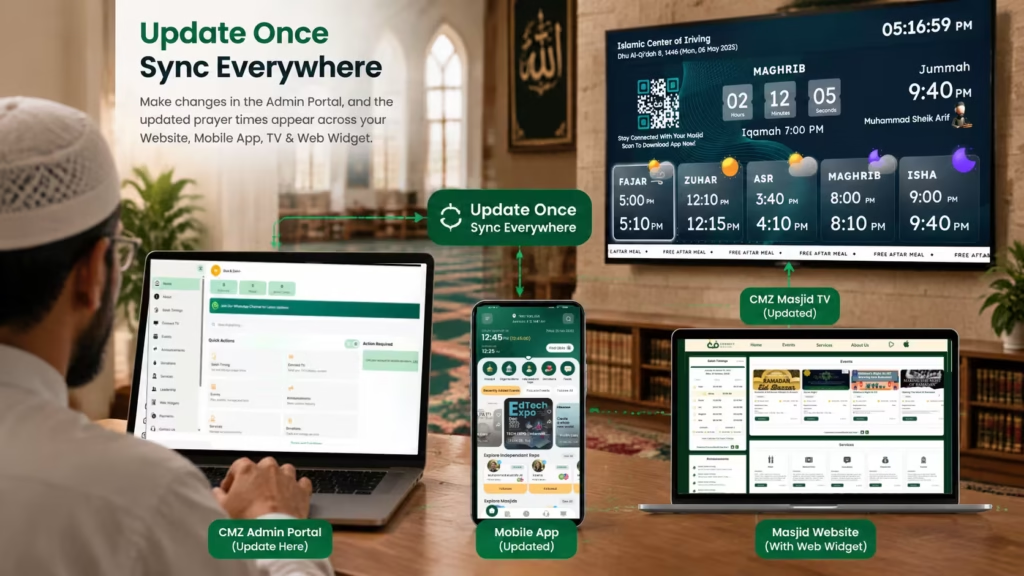
With CMZ Admin, administrators update information from one central place, and the same accurate information is delivered across connected platforms, including Masjid TV displays, mobile apps, websites, and web widgets.
1. Update Information in the CMZ Admin Portal
The process starts with the CMZ Admin Portal.
Administrators can manage information such as:
- Salah and Iqamah timings
- Jumu’ah information
- Events
- Announcements
- Flyers
- Community updates
- Services
- Leaderships
- Digital ads
This means an administrator doesn’t have to start by thinking about every individual platform.
Instead, they start with the information that needs to change.
Whether updating yearly Salah timings or making a last-minute Iqamah adjustment, administrators can manage the relevant information centrally through CMZ Admin.
2. CMZ Syncs Supported Information
CMZ makes this information available across the connected CMZ ecosystem, including Masjid TV displays, Mobile App, Web App, and Web Widgets, ensuring your community sees consistent and updated information wherever they access it.
The basic workflow is simple:
Centralize → Automate → Communicate
Your CMZ Admin Portal connects with supported CMZ experiences such as:
CMZ helps masjids share consistent information across their digital channels, including the Mobile App, Web App, Website through Web Widgets, Masjid TV displays, and social media platforms such as Facebook and Instagram.
The goal is straightforward: manage the information once instead of repeatedly recreating the same update across disconnected systems.
3. Your Community Finds the Information Where They Need It
Your community doesn’t all use the same screen.
Someone may get a notification on the mobile app. Another person may visit your website. A person already inside the masjid may look at the Masjid TV display.
Different screens serve different situations, but the information can remain connected through the CMZ ecosystem.
Different screens. One connected source of information.
What Can You Manage Through CMZ?
With CMZ Admin, masjids can manage essential information and settings from one central platform, including:
Salah & Iqamah Timings
Configure calculation methods, Asr madhab, high-latitude rules, Hijri date adjustments, and upload yearly Salah schedules or manually adjust timings when needed. These updates can be displayed across CMZ Masjid TV, Mobile App, Web App, and Web Widgets.
Prayer & Community Updates
Share Jumu’ah details, announcements, events, fundraisers, classes, and important notices. These can be showcased on TV displays inside the masjid, mobile app, website, and widgets to keep the community informed.
Digital Flyers & Notice Board Content
Upload flyers, posters, and community messages that can rotate between prayer timings on Masjid TV displays and appear across connected CMZ platforms.
Masjid Branding & Display Settings
Customize themes, colors, languages, layouts, and masjid identity so your screens and digital platforms match your community’s style.
Quran, Dua & Community Content
Schedule Quran recitations, Duas, Hadith, and reminders that can be displayed on Masjid TV to enhance the prayer environment.
Live Streaming & Media
Manage live video links, schedules, and display settings for showcasing streams and important broadcasts on connected screens.
Everything managed through CMZ Admin Portal is designed to keep your masjid’s digital platforms connected, so administrators update information once and the community sees consistent information wherever they interact with your masjid.
One Masjid, Multiple Digital Experiences
CMZ isn’t built around just one screen.
Each CMZ experience serves a different purpose while working as part of the wider ecosystem.
CMZ Masjid TV
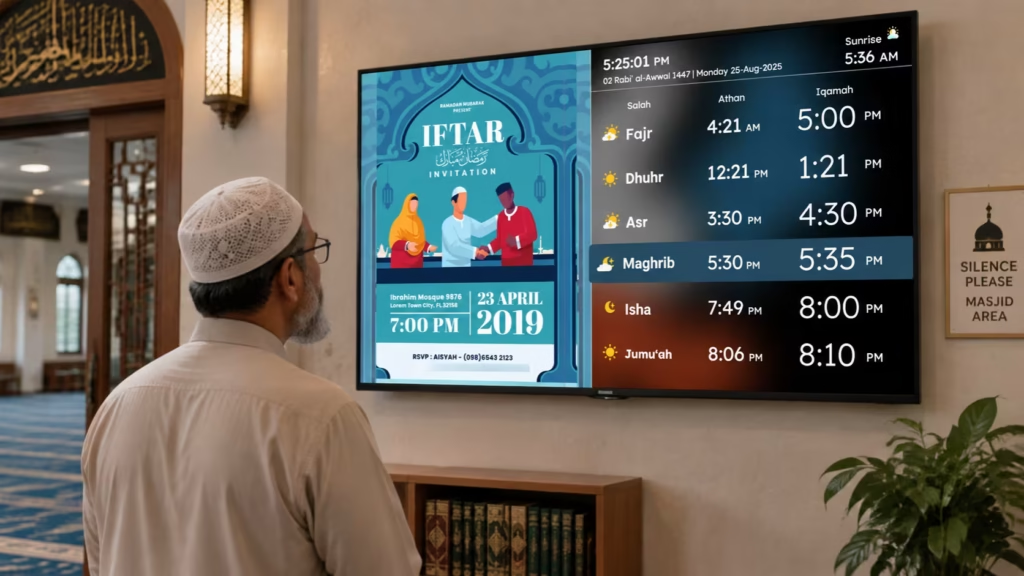
Inside the masjid, people need clear and accurate information they can see quickly from across the room. CMZ Masjid TV provides a complete mosque digital signage experience that goes beyond prayer displays by bringing Salah and Iqamah timings, announcements, events, Jumu’ah updates, community messages, Quran and Dua content, branding, and more onto your masjid screens.
With CMZ Masjid TV, administrators can manage what appears on their screens through the CMZ Admin Portal, ensuring the display stays updated, engaging, and aligned with the masjid’s needs without requiring separate manual updates.
CMZ Mobile App
The mobile app gives community members access to masjid information directly from their phones, including prayer times, Iqamah updates, announcements, events, and important community updates. Musallis can receive custom notifications, stay informed about changes, explore masjid events, access updates, and stay connected with their masjid wherever they are.
For administrators, the benefit is that the app becomes part of the same connected system rather than another completely separate platform to maintain. Through CMZ Admin Portal, updates can be managed centrally and shared across the connected CMZ ecosystem, reducing repetitive work while keeping the community informed.
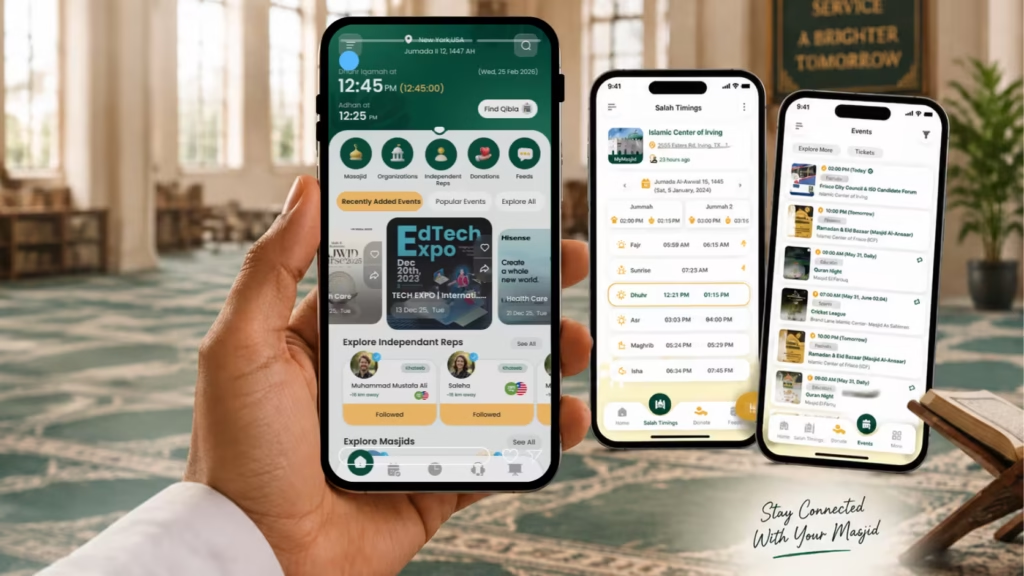
CMZ Web App
The CMZ Web App is an extension of the mobile app that gives community members another way to access masjid information through a browser. It also helps your masjid become more discoverable through Google Search, allowing people to find important information such as prayer times, events, announcements, and community updates when they search online. This makes it easier for both existing members and new visitors to connect with your masjid.
CMZ Web Widgets
CMZ Web Widgets are connected directly with the CMZ Admin Portal, so administrators don’t need to update their website information separately. When a masjid updates prayer timings, events, announcements, or other community information in CMZ Admin, the changes automatically reflect on the connected web widget.
Keep Your Community Updated with Iqamah Change Notifications
With separate systems, the administrator may update the website, check the mobile app, look at the TV, and make sure the website widget isn’t still showing the old time.
Then comes the familiar question:
“Did anyone update the other screen?”
The problem isn’t that changing one time is difficult.
The problem is having to remember where else that same information needs to be changed.
With CMZ, the authorized administrator updates the relevant information centrally through the Admin Portal, and connected CMZ experiences can use the updated information.
Without a Connected System
- Update multiple platforms
- Re-enter the same information
- Remember every digital channel
- Check for missed updates
- Maintain separate workflows
With CMZ
- Manage information centrally
- Reduce repetitive updates
- Keep connected experiences aligned
- Make changes from the Admin Portal
- Spend less time maintaining individual platforms
The administrator manages the information. CMZ handles the connected experience.
Do You Have to Update Every CMZ Platform Separately?
No.
The CMZ Admin Portal is the central command system that helps masjids manage their digital presence from one place, reducing repetitive work across multiple platforms.
Administrators manage supported information centrally, and connected CMZ experiences can use that information.
A mobile app, website widget, and large TV display have completely different purposes.
The important thing is that the underlying supported information stays connected, while each experience presents it in a way that makes sense for its audience.
Why Centralized Mosque Management Matters?
For masjid administrators and volunteers, the biggest benefit isn’t another dashboard.
It’s less repetitive work and more time to focus on the community.
Less Admin Work
With CMZ Admin Portal, masjids can manage prayer timings, announcements, events, and community updates from one centralized platform instead of repeating the same updates across multiple systems.
Fewer Conflicting Updates
When information is managed through CMZ Admin Portal, updates stay consistent across your connected CMZ platforms. Your community sees the same accurate information whether they check the mobile app, website, web widget, or Masjid TV.
Faster Changes
Prayer schedules, Jumu’ah details, announcements, and events can change quickly. With CMZ Admin, administrators can make updates once and keep their connected platforms aligned without managing each one separately.
Easier for Volunteers
Most masjids don’t have a dedicated IT department.
Administrators, committee members, and volunteers manage digital communication alongside many other responsibilities.
CMZ Admin simplifies that process by giving them one place to manage their masjid’s digital presence instead of maintaining multiple disconnected systems.
A Better Community Experience
At the end of the day, synchronization is about more than technology.
It’s about making sure your community always has access to accurate masjid information, wherever they find it, so administrators can spend less time managing systems and more time serving their community.
From One Admin Portal to Your Entire Digital Ecosystem
The idea behind CMZ is simple:
Your Masjid
↓
CMZ Admin Portal
↓
Connected CMZ Ecosystem
↓
Mobile · Web · Widgets · TV. Socials
When an Iqamah time changes, an event is updated, or a new announcement needs to go out, administrators shouldn’t have to wonder:
They should be able to focus on a much simpler question:
“What information needs to change?”
That’s the value of connected mosque management software.
Conclusion: One Update Shouldn’t Become Multiple Repetitive Tasks
Managing a modern masjid means communicating with your community across more platforms than ever before.
People check prayer times on their phones, visit the website,, and look at digital displays inside the masjid. The challenge is not simply showing information in different places. The real challenge is keeping that information accurate and consistent.
That is where connected mosque management software makes a difference.
CMZ brings your masjid’s digital experiences together through one centralized Admin Portal, allowing administrators to manage supported prayer times, announcements, events, flyers, and community information from one place.
Administrators can focus on one simple thing:
Updating the right information for their community.
With CMZ, your masjid gets a connected ecosystem that helps reduce repetitive work, improve consistency, and make important information easier for your community to access.
One masjid. One connected system. Multiple ways to keep your community informed.
Ready to simplify your masjid’s digital communication?
Explore CMZ today and discover a smarter way to manage your masjid’s digital presence.
Ready to Simplify Your Masjid’s Digital Communication?
Your masjid’s time should be dedicated to serving the community and ibadah, not worrying whether your app, website, widget, and TV are showing the same information. CMZ keeps everything connected, so you can focus on what truly matters.
With CMZ mosque management software, administrators get a centralized way to manage supported masjid information and keep their connected digital experiences aligned.
Manage your masjid’s information from one place. Keep your community connected wherever they look.
Explore CMZ today and see how a connected mosque management platform can simplify your everyday administration.
Frequently Asked Questions
CMZ allows Salah and Iqamah information to be managed centrally and used by vague connected CMZ experiences, reducing the need to maintain the same schedule separately across multiple platforms.
No separate TV updates are required. Any changes made through the CMZ Admin Portal are automatically reflected across your connected CMZ ecosystem, including your Masjid TV.
Yes. CMZ Web Widgets can bring masjid information into an existing website, including prayer-time information, updates, etc.
Yes. Masjids can connect and manage multiple TV displays through the CMZ Admin Portal. Screens can be used in areas such as the main prayer hall, entrance, lobby, or sisters’ section.
CMZ Masjid TV supports offline functionality for information already available to the display. New updates require connectivity to reach the TV.
Yes. The CMZ Admin Portal is web-based and can be accessed through browsers on devices such as phones and laptops.
No. Each CMZ experience is designed for a different context. The goal is to keep supported information connected while presenting it appropriately across mobile, web, widgets, and TV.