How to Display Salah & Iqamah Times on TV Screen?

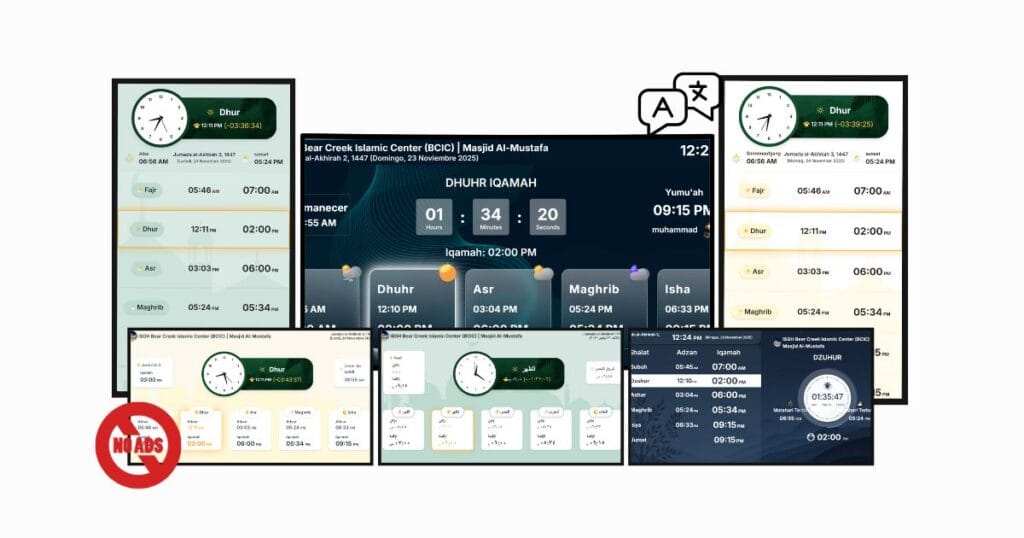
Smart TV showing ConnectMazjid masjid display system to display Salah and Iqamah times with digital prayer timetable

Many masjids today want a simple and reliable way to display Salah and Iqamah times on a TV screen. But they still rely on printed charts, manual whiteboards, or WhatsApp updates, which quickly become outdated.With ConnectMazjid, masjids can show precise prayer timings across any Smart TV, Fire TV Stick, or Android screen—without manual work.

Modern masjids are increasingly adopting digital tools that make prayer time management effortless. ConnectMazjid offers a completely free, cloud-based solution that automatically displays real-time salah and iqamah timings across 300+ masjid TV screens—no manual updates required. Many committees often search for answers like, “How do I show salah times on a TV?” “How do I set up a digital salah display?”, or “Which is the best masjid display software?”

This guide explains how masjids can set up and display salah and iqamah times on a TV using ConnectMazjid – a free, cloud-based digital salah display system that works on Smart TVs, FireTV  Stick, and Android devices.

Why Should Masjids Display Salah and Iqamah Times Digitally?

Adopting a digital salah display system provides significant advantages over traditional methods, moving your masjid toward a more efficient and professional operation.

Convenience and Accuracy for Worshippers

  • Ensures accurate, updated Salah & Iqamah times
  • It helps to avoid confusion during seasonal changes, the transition to or from daylight saving, or unexpected schedule adjustments.

Modern and Professional Look for Masjids

  • Using a TV salah timing system creates a welcoming, organized, and professional environment.
  • It makes important announcements and reminders highly visible and immediately noticeable to the congregation via your masjid prayer board.

Real-Time Updates Without Manual Effort

  • ConnectMazjid automates the schedule management, reducing the burden on staff, and is very user friendly.
  • Timings are updated via cloud synchronization across all the platforms be it Masjid TV Display, on the Masjid Website or on CMZ’s Mob App, and is controlled from an easy-to-use CMZ admin panel, ensuring consistency across all platforms and displays.

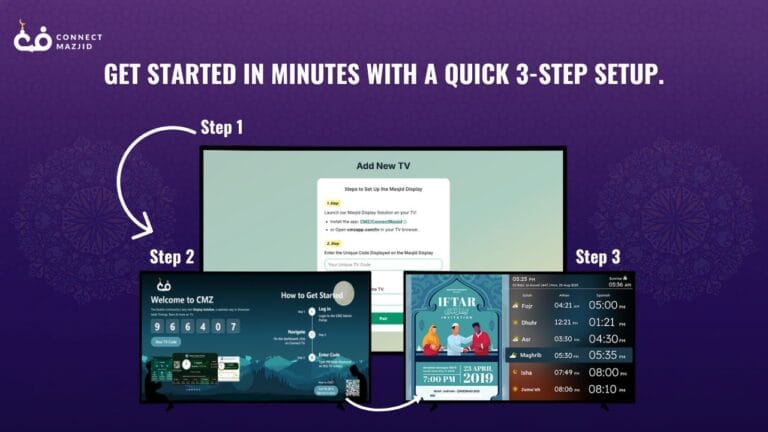
4-Step Guide: How to Display Salah and Iqamah Times on a TV Screen

Step 1: Install & Register

  • Sign up for a free ConnectMazjid account and create your masjid profile.
  • Set up your TV (Smart TV, Google TV, Fire TV Stick, or HDMI screen) .

Step 2: Instant TV Pairing

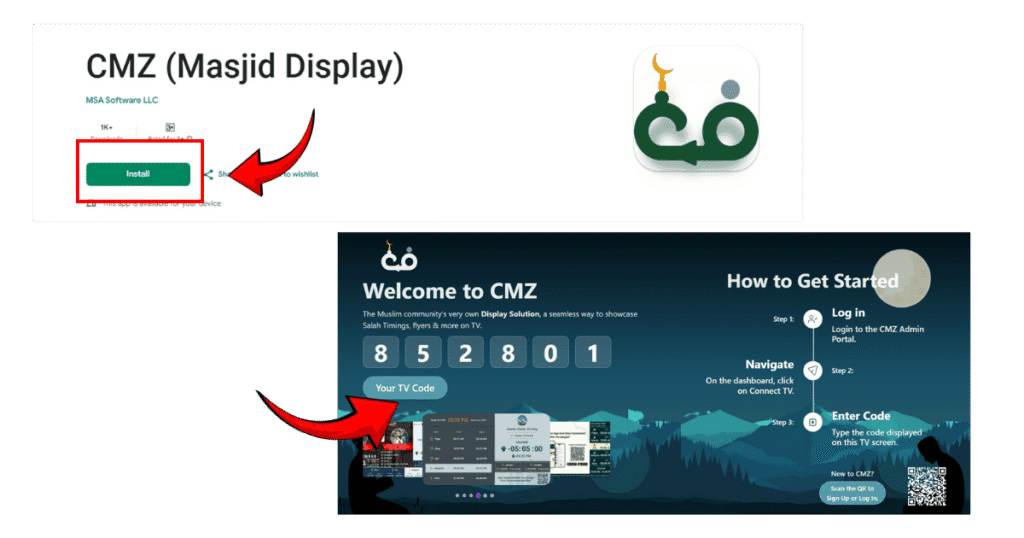
  • Install CMZ Masjid Display from the Play Store or open cmzapp.com/tv,  if your TV doesn’t have a Playstore, use the TV’s Browser or Android Stick.
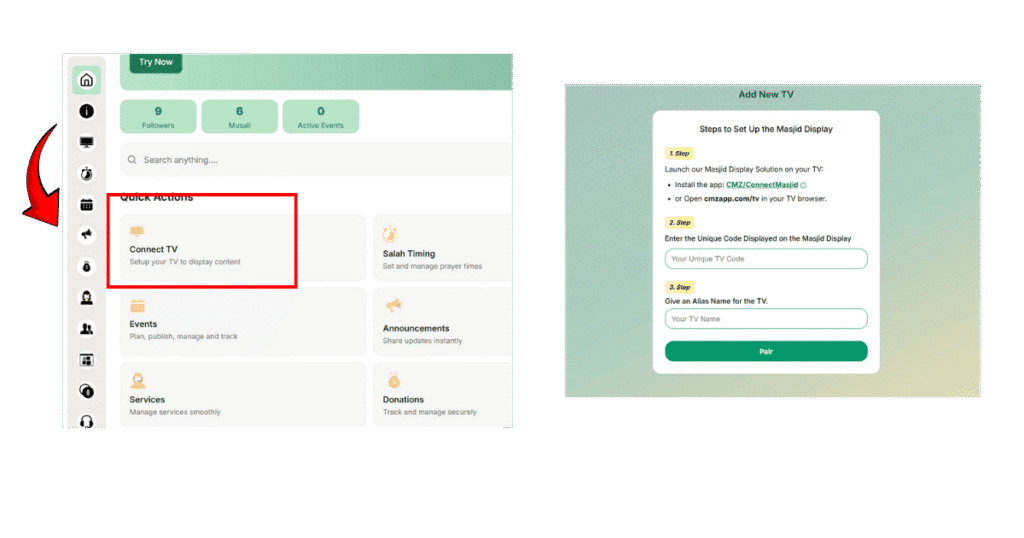
  • Note the pairing code shown on the TV and enter it in your CMZ Admin Portal → Connect TV.

Step 3:Upload Timings & Customize

  • Upload monthly or yearly prayer schedules or enable prayer APIs.
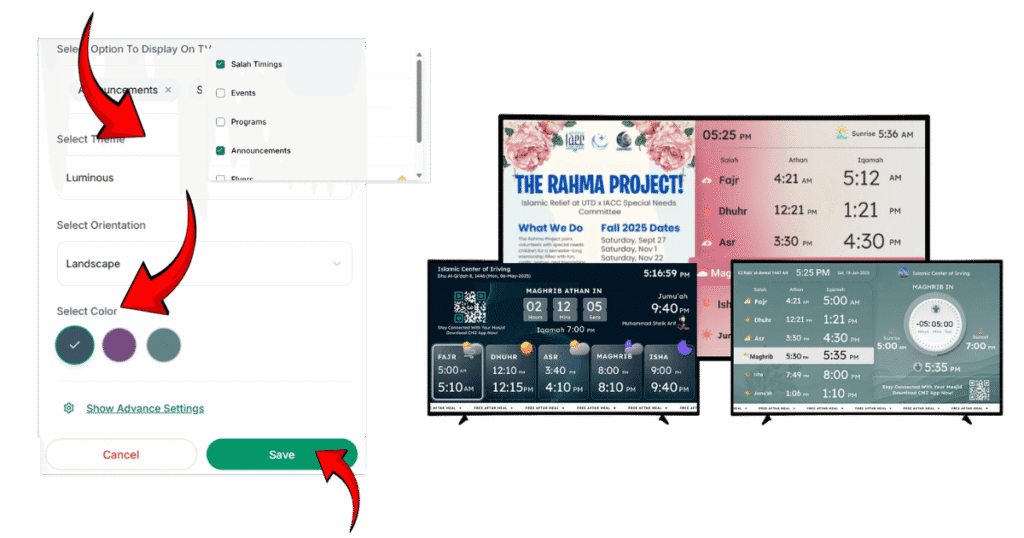
  • Once the TV is paired from the Connect TV section, customize your screen’s themes, colors.

Step 4:Remote Update & Manage

  • Use the dashboard (mobile or desktop) to push announcements, change themes, or update timings instantly.
  • All connected screens sync automatically.
CMZ Masjid Display app installation page and TV code screen for setting up Salah and Iqamah time display
CMZ admin dashboard showing Connect TV option to set up Salah and Iqamah time display on a screen
CMZ setup screen showing how to customize themes to display Salah and Iqamah times on a masjid TV

Which Devices Can You Use? (Compatibility Guide)

Supported Devices

  • Smart TVs (Samsung, LG, Mi, OnePlus)
  • Android TV / Google TV
  • Amazon Fire Stick
  • Any monitor via laptop
  • LED screens with HDMI
  • Windows / Mac browsers

How ConnectMazjid Makes TV Displays Easy

ConnectMazjid provides a cloud-based prayer time display system that turns any screen into an Athan clock.
You only need:

  • A Smart TV OR
  • A normal TV with a device like Android TV Stick / Amazon Firestick
  • Internet connection

Once connected, your Salah & Iqamah timings update automatically every day..


Key Features of CMZ Salah Display:

Real-Time Salah Timings

  • Automatically updates based on your masjid’s configurable calendar
  • Supports all prayer types: Fajr, Dhuhr, Asr, Maghrib, Isha

Iqamah Countdown Timer

  • Live countdown for upcoming salah
  • Auto-syncs with your daily prayer timetable
  • High visibility for worshippers

Digital Masjid Signage

  • Display announcements and events
  • Show reminders, notices, community updates

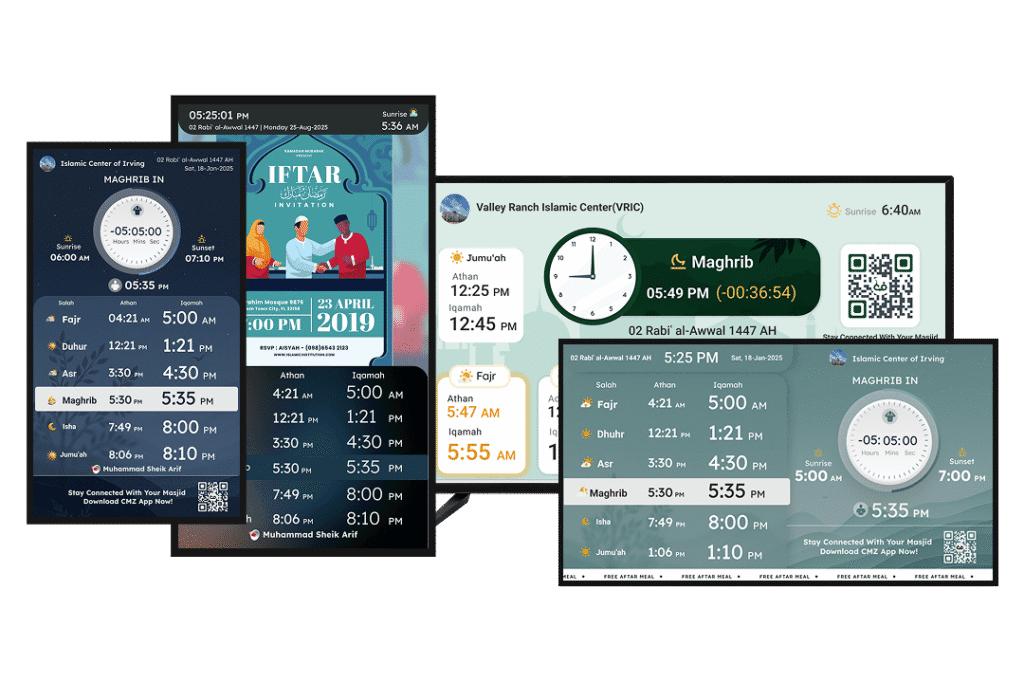
Multiple Screen Layouts

  • Clean clock+prayer time layout
  • Modern grid-style display
  • Full-screen announcements
  • Multi-language support

Additional Information Display

  • Hijri date
  • Local weather
  • Next prayer highlight
Digital signage for mosques by ConnectMazjid displaying Salah and Iqamah times with Auto Blackout feature

Benefits of Using ConnectMazjid for Salah & Iqamah Displays 

ConnectMazjid is a full-featured masjid display software designed to automate Salah and Iqamah updates across any screen.

1. Centralized Control for Multiple Masjid Displays

  • Manage multiple screens from a single cloud dashboard.
  • Push updates instantly to all connected TVs and devices.

2. Real-Time Sync With Global Prayer Time APIs

ConnectMazjid automatically calculates Salah times based on:

  • Automatically adjusts and calculates timings based on your local time zone.
  • Choose from different calculation methods (Islamic Society of North America (ISNA), Muslim World League(MWL), and many more.
  • Customizable prayer angles for Fajr & Isha
  • Real-time sync with local sunrise/sunset patterns.

3. Display Announcements and Community Messages

Masjids can add dynamic content directly to their screens, including:

  • Ramadan iftar/suhoor schedules
  • Jumu’ah khutbah timings
  • Upcoming events
  • Flyers, notices, reminders
  • Digital ad boards for mosque fundraising

This turns the TV into a full digital notice board.

4. Simple Interface for All Staff

  • Clean, intuitive dashboard
  • Live preview before publishing changes
  • No technical skills needed
  • Accessible from any mobile, tablet, or laptop


Tips for Setting Up a Professional Masjid Display 

To ensure visibility and clarity:

  • Use High-Contrast Colors: Dark text on light background or vice versa.
  • Place the Screen at Eye Level: Avoid glare from windows.
  • Ensure Stable Internet: Keeps timings in real-time sync.

Why Choose ConnectMazjid Over Other Masjid Display Solutions? 

ConnectMazjid stands out because it is:

Built Specifically for Mosques & Islamic Centres

ConnectMazjid is built specifically for masjid administrators; it is a full-featured masjid management system designed specifically for the unique needs of mosque administrators.

Fully Multilingual (7+ Languages)

English, Arabic, Indonesian, Spanish, French, German, and Italian.

Integrated With Masjid Management Modules

Unlike generic apps, ConnectMazjid is a full masjid management system with modules for:

Free, Ad-Free, and Professionally Managed

  • No forced ads
  • Regular feature updates
  • Dedicated support team

All-in-One Digital Infrastructure

Displays on:

  • TV screens
  • Mobile apps
  • Masjid websites

Ready to upgrade?

Book a free demo or Sign up to connect your first TV in minutes.

Sign Up Now For Free!

Frequently Asked Questions(FAQs)

Yes. ConnectMazjid will be able to save your timings offline, so the screen continues to work even without internet (an upcoming feature).

Absolutely. You can set individual iqamah intervals or fixed times for each Salah.

ConnectMazjid is one of the most complete systems, offering real-time automation, multilingual support with up to 7+ languages, and centralized cloud updates.

Use the CMZ Masjid Display App or open the TV URL: cmzapp.com/tv on any Smart TV/Fire Stick or Android Stick.Pair it with your CMZ Admin Portal to instantly display real-time prayer schedules.

Yes. The cloud-based dashboard allows updates from anywhere using any web-enabled device (laptop, tablet, phone).

The CMZ TV App. It is free, ad-free masjid display software built specifically for real-time Athan, Iqamah, events, flyers, and announcement display.

ConnectMazjid: free core features, zero hardware required, mobile app control, and integrated event/donation modules.

Conclusion

ConnectMazjid is an all-in-one masjid management and digital display system built for mosque administrators. With multilingual layouts, seamless integrations, and free updates, it delivers accurate Salah and Iqamah displays across TV screens, mobile apps, and websites. It reduces manual work, keeps prayer timings precise, and helps masjids stay organized, modern, and connected.

Scroll to Top