Make us preferred on Google
.cmzb{--g:#1E7A46;--g-dark:#124A2C;--g-deep:#0E3D28;--g-text:#1B7A45;--gold:#F4B400; --ink:#16241C;--body:#425049;--muted:#8A968E;--line:#E6EDE8;--tint:#EFF6F1;--soft:#F5F9F6; --sans:'Manrope',system-ui,-apple-system,'Segoe UI',sans-serif;--wrap:1120px;--read:780px;--edge:clamp(22px,5vw,44px)} .cmzb *,.cmzb *::before,.cmzb *::after{box-sizing:border-box} .cmzb{font-family:var(--sans);color:var(--body);line-height:1.6;-webkit-font-smoothing:antialiased;overflow-x:hidden} .cmzb img{max-width:100%;display:block} .cmzb a{color:var(--g);text-decoration:none;font-weight:600;border-bottom:1.5px solid rgba(30,122,70,.3);transition:border-color .15s} .cmzb a:hover{border-color:var(--g)} .cmzb h1,.cmzb h2,.cmzb h3,.cmzb h4{margin:0;color:var(--ink);font-weight:800;letter-spacing:-.02em;line-height:1.18} .cmzb p{margin:0} .cmzb-wrap{max-width:var(--wrap);margin:0 auto;padding-inline:var(--edge)} .cmzb-read{max-width:var(--read);margin:0 auto} html{scroll-behavior:smooth} .cmzb [id]{scroll-margin-top:90px} @media(prefers-reduced-motion:reduce){.cmzb *{transition:none!important;animation:none!important}html{scroll-behavior:auto}} /* ---------- hero ---------- */ .cmzb-hero{position:relative;overflow:hidden;padding-block:clamp(40px,6vw,72px) clamp(26px,3vw,34px); background:radial-gradient(1000px 560px at 50% -10%,rgba(30,122,70,.16),transparent 60%),linear-gradient(180deg,#E7F1EB,var(--tint) 55%,#FBFDFC)} .cmzb-hero::before{content:'';position:absolute;inset:0;z-index:0;pointer-events:none;opacity:.5; background-image:url("data:image/svg+xml,%3Csvg xmlns='http://www.w3.org/2000/svg' width='44' height='44' viewBox='0 0 44 44'%3E%3Cg fill='none' stroke='%231E7A46' stroke-opacity='0.1'%3E%3Ccircle cx='0' cy='0' r='22'/%3E%3Ccircle cx='44' cy='0' r='22'/%3E%3Ccircle cx='0' cy='44' r='22'/%3E%3Ccircle cx='44' cy='44' r='22'/%3E%3Ccircle cx='22' cy='22' r='22'/%3E%3C/g%3E%3C/svg%3E");background-size:44px 44px; -webkit-mask:radial-gradient(120% 86% at 50% 24%,#000,transparent 76%);mask:radial-gradient(120% 86% at 50% 24%,#000,transparent 76%)} .cmzb-hero .cmzb-wrap{position:relative;z-index:1} .cmzb-crumb{display:flex;flex-wrap:wrap;gap:8px;justify-content:center;font-size:12.5px;font-weight:700;color:var(--muted)} .cmzb-crumb a{color:var(--muted);border:none}.cmzb-crumb a:hover{color:var(--g)} .cmzb-crumb span{color:var(--line)} .cmzb-pill{display:inline-flex;align-items:center;gap:7px;margin:0 auto;padding:6px 14px;border-radius:999px;background:#fff;border:1px solid var(--line);box-shadow:0 4px 14px -9px rgba(20,74,44,.3);font-size:12px;font-weight:800;letter-spacing:.06em;text-transform:uppercase;color:var(--g)} .cmzb-pill svg{width:15px;height:15px} .cmzb-hero__head{text-align:center;max-width:860px;margin:16px auto 0} .cmzb-hero h1{font-size:clamp(30px,4.6vw,52px);line-height:1.08} .cmzb-hero__dek{margin-top:16px;font-size:clamp(16px,1.6vw,19px);color:var(--body);font-weight:500;line-height:1.55;max-width:60ch;margin-inline:auto} .cmzb-meta{margin-top:20px;display:flex;flex-wrap:wrap;gap:10px 18px;align-items:center;justify-content:center;font-size:13px;font-weight:600;color:var(--muted)} .cmzb-meta .dot{width:4px;height:4px;border-radius:50%;background:var(--muted)} .cmzb-meta .who{display:inline-flex;align-items:center;gap:9px;color:var(--ink)} .cmzb-meta .av{width:30px;height:30px;border-radius:50%;background:linear-gradient(155deg,var(--g),var(--g-deep));color:#fff;display:grid;place-items:center;font-weight:800;font-size:12px} .cmzb-meta svg{width:15px;height:15px;color:var(--g);vertical-align:-2px;margin-right:5px} /* ---------- article ---------- */ .cmzb-article{padding-block:clamp(34px,5vw,56px)} .cmzb-lead{font-size:clamp(17px,1.7vw,20px);line-height:1.7;color:#2b3832;font-weight:500} .cmzb-lead b{color:var(--ink);font-weight:800} .cmzb-read>h2{font-size:clamp(23px,2.9vw,32px);margin-top:clamp(38px,4.4vw,54px)} .cmzb-read>h3{font-size:clamp(19px,2.2vw,24px);margin-top:clamp(34px,4vw,46px);display:flex;align-items:center;gap:14px} .cmzb-read>h3 .n{flex:0 0 auto;width:42px;height:42px;border-radius:12px;background:linear-gradient(155deg,var(--g),var(--g-deep));color:#fff;display:grid;place-items:center;font-size:12px;font-weight:800;letter-spacing:.02em;box-shadow:0 12px 24px -14px rgba(20,74,44,.6);line-height:1;text-align:center} .cmzb-read>h3 .n small{display:block;font-size:8.5px;letter-spacing:.1em;text-transform:uppercase;opacity:.8;margin-bottom:1px} .cmzb-read>h3 .n b{font-size:17px;display:block;font-weight:800} .cmzb-read>h2+p,.cmzb-read>h3+p{margin-top:14px} .cmzb-read>p{font-size:17px;line-height:1.78;margin-top:16px} .cmzb-read>p+p{margin-top:14px} .cmzb-read p b,.cmzb-read li b{color:var(--ink);font-weight:700} .cmzb-sub{margin-top:22px!important;font-weight:800;color:var(--ink);font-size:15px!important;letter-spacing:.01em} /* TOC card */ .cmzb-toc{margin-top:26px;padding:20px 22px;border-radius:16px;background:#fff;border:1px solid var(--line);box-shadow:0 18px 44px -32px rgba(20,74,44,.5)} .cmzb-toc b{display:flex;align-items:center;gap:9px;font-size:12px;font-weight:800;letter-spacing:.08em;text-transform:uppercase;color:var(--g)} .cmzb-toc b svg{width:16px;height:16px} .cmzb-toc ol{margin:14px 0 0;padding:0;list-style:none;counter-reset:toc;display:grid;gap:9px} @media(min-width:620px){.cmzb-toc ol{grid-template-columns:1fr 1fr;gap:9px 24px}} .cmzb-toc li{counter-increment:toc;display:flex;gap:10px;align-items:baseline;font-size:14.5px;font-weight:600} .cmzb-toc li::before{content:counter(toc,decimal-leading-zero);font-family:var(--sans);font-weight:800;color:var(--g);font-size:12px;flex:0 0 auto} .cmzb-toc a{color:var(--ink);border:none}.cmzb-toc a:hover{color:var(--g)} /* figure */ .cmzb-fig{margin:clamp(24px,3.2vw,36px) 0 0} .cmzb-fig img{width:100%;height:auto;border-radius:16px;box-shadow:0 34px 66px -42px rgba(14,61,40,.5);border:1px solid rgba(20,74,44,.08);background:var(--soft)} /* lists */ .cmzb-list{margin:18px 0 0;padding:0;list-style:none;display:grid;gap:10px} .cmzb-list li{position:relative;padding:13px 16px 13px 50px;border-radius:12px;background:#fff;border:1px solid var(--line);font-size:15.5px;line-height:1.55;font-weight:600;color:var(--ink)} .cmzb-list li::before{content:'';position:absolute;left:15px;top:50%;transform:translateY(-50%);width:22px;height:22px;border-radius:50%;background:var(--tint) url("data:image/svg+xml,%3Csvg xmlns='http://www.w3.org/2000/svg' viewBox='0 0 24 24' fill='none' stroke='%231E7A46' stroke-width='3' stroke-linecap='round' stroke-linejoin='round'%3E%3Cpath d='M5 12.5l4.5 4.5L19 7.5'/%3E%3C/svg%3E") center/13px no-repeat} .cmzb-ol{margin:18px 0 0;padding:0;list-style:none;counter-reset:st;display:grid;gap:10px} .cmzb-ol li{counter-increment:st;position:relative;padding:13px 16px 13px 56px;border-radius:12px;background:#fff;border:1px solid var(--line);font-size:15.5px;line-height:1.55;font-weight:600;color:var(--ink)} .cmzb-ol li::before{content:counter(st);position:absolute;left:15px;top:50%;transform:translateY(-50%);width:28px;height:28px;border-radius:50%;background:var(--g);color:#fff;display:grid;place-items:center;font-size:13px;font-weight:800} /* feature cards */ .cmzb-feats{margin-top:22px;display:flex;flex-direction:column;gap:14px} .cmzb-feat{position:relative;display:grid;grid-template-columns:auto 1fr;gap:16px;align-items:center;padding:clamp(16px,2.2vw,22px);border-radius:16px;background:#fff;border:1px solid var(--line); box-shadow:0 2px 4px rgba(20,74,44,.03),0 20px 44px -34px rgba(20,74,44,.45);transition:transform .18s,box-shadow .18s,border-color .18s} .cmzb-feat:hover{transform:translateY(-3px);border-color:rgba(30,122,70,.4);box-shadow:0 28px 54px -34px rgba(20,74,44,.5)} .cmzb-feat__n{width:50px;height:50px;border-radius:14px;background:linear-gradient(155deg,var(--g),var(--g-deep));color:#fff;display:grid;place-items:center;flex:0 0 auto;box-shadow:0 14px 26px -14px rgba(20,74,44,.6)} .cmzb-feat__n svg{width:24px;height:24px} .cmzb-feat__b h4{font-size:clamp(16px,1.9vw,18px)} .cmzb-feat__b p{margin-top:5px;font-size:15px;line-height:1.6;color:var(--body)} /* callout */ .cmzb-call{margin-top:24px;display:flex;gap:15px;padding:20px 22px;border-radius:16px; background:linear-gradient(150deg,#F2FAF5,#E9F5EE);border:1px solid rgba(30,122,70,.18)} .cmzb-call__i{width:42px;height:42px;flex:0 0 auto;border-radius:12px;background:#fff;border:1px solid var(--line);color:var(--g);display:grid;place-items:center;box-shadow:0 10px 22px -14px rgba(20,74,44,.5)} .cmzb-call__i svg{width:21px;height:21px} .cmzb-call p{font-size:15.5px!important;line-height:1.68!important;margin:0!important;color:var(--body)} .cmzb-call p+p{margin-top:8px!important} /* inline CTA strip */ .cmzb-inline{margin-top:28px;display:flex;flex-wrap:wrap;align-items:center;gap:14px 20px;justify-content:space-between; padding:20px 24px;border-radius:16px;background:linear-gradient(150deg,#F4FAF6,#EAF5EE);border:1px dashed rgba(30,122,70,.35)} .cmzb-inline p{font-size:15px!important;line-height:1.6!important;margin:0!important;color:var(--body);flex:1 1 280px} .cmzb-btn{display:inline-flex;align-items:center;justify-content:center;gap:9px;padding:13px 22px;border-radius:11px;font-weight:700;font-size:14.5px;border:1.5px solid transparent;cursor:pointer;transition:transform .18s,background .18s,box-shadow .18s} .cmzb a.cmzb-btn{border-bottom:1.5px solid transparent} .cmzb-btn svg{width:16px;height:16px} .cmzb-btn:hover{transform:translateY(-2px)} .cmzb-btn--g{background:var(--g)!important;color:#fff!important;border:none!important;box-shadow:0 12px 26px -14px rgba(30,122,70,.6)} .cmzb-btn--g:hover{background:var(--g-dark)!important} .cmzb-btn--o{background:#fff;color:var(--ink);border-color:var(--line)} .cmzb-btn--o:hover{border-color:var(--g)} /* FAQ */ .cmzb-faq{background:linear-gradient(180deg,#FBFDFC,#EFF6F1 60%,#FBFDFC);padding-block:clamp(40px,6vw,72px)} .cmzb-faq__h{text-align:center;max-width:640px;margin:0 auto 28px} .cmzb-faq__h h2{margin-top:14px;font-size:clamp(24px,3vw,34px)} .cmzb-fgrid{max-width:var(--read);margin:0 auto;display:flex;flex-direction:column;gap:12px} .cmzb-q{background:#fff;border:1px solid var(--line);border-radius:14px;overflow:hidden;box-shadow:0 10px 30px -24px rgba(20,74,44,.4);transition:border-color .2s,box-shadow .2s} .cmzb-q[open]{border-color:rgba(30,122,70,.45);box-shadow:0 20px 44px -28px rgba(20,74,44,.45)} .cmzb-q summary{list-style:none;cursor:pointer;padding:18px 22px;display:flex;justify-content:space-between;gap:16px;align-items:center;font-weight:700;color:var(--ink);font-size:16px;line-height:1.35} .cmzb-q summary::-webkit-details-marker{display:none} .cmzb-q summary::after{content:'+';width:26px;height:26px;flex:0 0 auto;border-radius:50%;background:var(--tint);color:var(--g);font-size:18px;display:flex;align-items:center;justify-content:center;transition:.2s} .cmzb-q[open] summary::after{content:'\2013';background:var(--g);color:#fff} .cmzb-q p{padding:0 22px 18px;font-size:15px;line-height:1.68;color:var(--body)} /* end CTA band */ .cmzb-cta{position:relative;overflow:hidden;color:#fff;padding-block:clamp(44px,6vw,78px); background:radial-gradient(800px 460px at 86% 8%,rgba(30,122,70,.5),transparent 60%),linear-gradient(150deg,var(--g-deep),#0b3220 60%,var(--g-dark))} .cmzb-cta::before{content:'';position:absolute;inset:0;opacity:.5;pointer-events:none; background-image:url("data:image/svg+xml,%3Csvg xmlns='http://www.w3.org/2000/svg' width='48' height='48' viewBox='0 0 48 48'%3E%3Cg fill='none' stroke='%23ffffff' stroke-opacity='0.06'%3E%3Ccircle cx='0' cy='0' r='24'/%3E%3Ccircle cx='48' cy='0' r='24'/%3E%3Ccircle cx='0' cy='48' r='24'/%3E%3Ccircle cx='48' cy='48' r='24'/%3E%3Ccircle cx='24' cy='24' r='24'/%3E%3C/g%3E%3C/svg%3E");background-size:48px 48px; -webkit-mask:radial-gradient(130% 100% at 70% 30%,#000,transparent 82%);mask:radial-gradient(130% 100% at 70% 30%,#000,transparent 82%)} .cmzb-cta .cmzb-wrap{position:relative;z-index:1;text-align:center;max-width:720px} .cmzb-cta h2{color:#fff;font-size:clamp(25px,3.4vw,38px)} .cmzb-cta p{margin-top:14px;color:rgba(255,255,255,.84);font-size:16px;line-height:1.65} .cmzb-cta__btns{margin-top:28px;display:flex;flex-wrap:wrap;gap:13px;justify-content:center} @media(max-width:560px){ .cmzb-feat{grid-template-columns:1fr;gap:12px} .cmzb-call{flex-direction:column;gap:12px} .cmzb-inline{padding:18px} .cmzb-inline .cmzb-btn{width:100%} }
Masjid TV · Setup Guide

Mosque Display Software: 5 Easy Steps to Get Started

Mosque display software can turn an ordinary TV into a digital prayer timetable your entire congregation can rely on.

CMConnectMazjid Team 5 min read Step-by-step guide

Imagine it's Friday afternoon. Your masjid's Jumu'ah timings have changed, but the TV at the entrance still shows last week's schedule. Someone needs to find the volunteer, open the settings, and fix it.

Sound familiar? With the right system, manage Salah timings, Iqamah updates, announcements, and events from one dashboard—without manually changing every TV or buying expensive equipment.

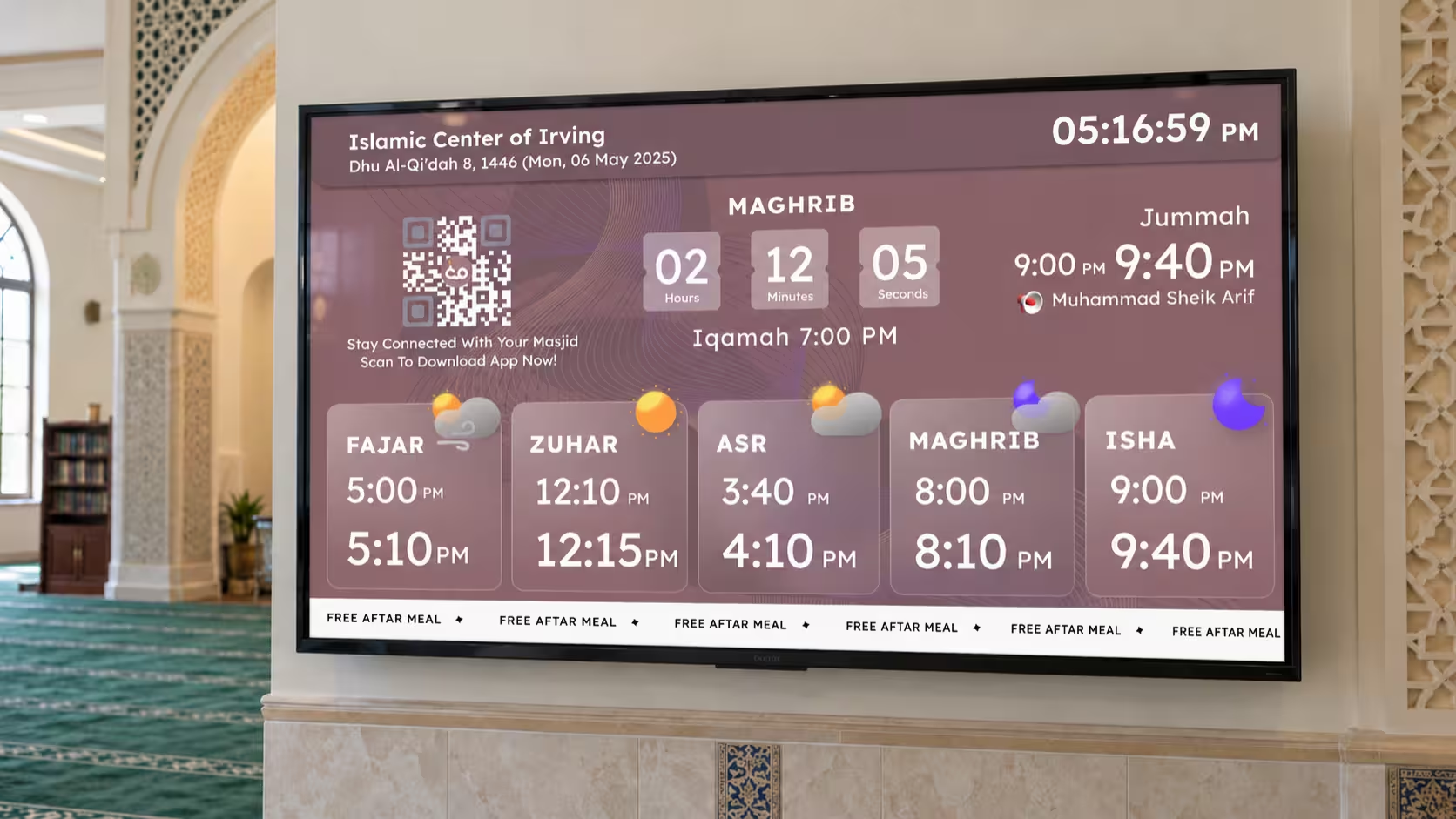
Mosque display software showing prayer timings on a TV screen in a masjid

How Does Mosque Display Software Work?

Think of mosque display software as the connection between your masjid's information and its TV screens.

You enter your prayer schedule and other details into an online dashboard. The software sends that information to your connected displays.

For example, when your masjid changes the Asr Iqamah time, you update it in one place instead of visiting every screen.

You can also manage Jumu'ah timings, announcements, and upcoming events, depending on the platform you choose.

Now, let's get your first display running.

5 Easy Steps to Set Up Mosque Display Software

Step1Step 1: Check Your TV and Internet Connection

Start with the equipment your masjid already has.

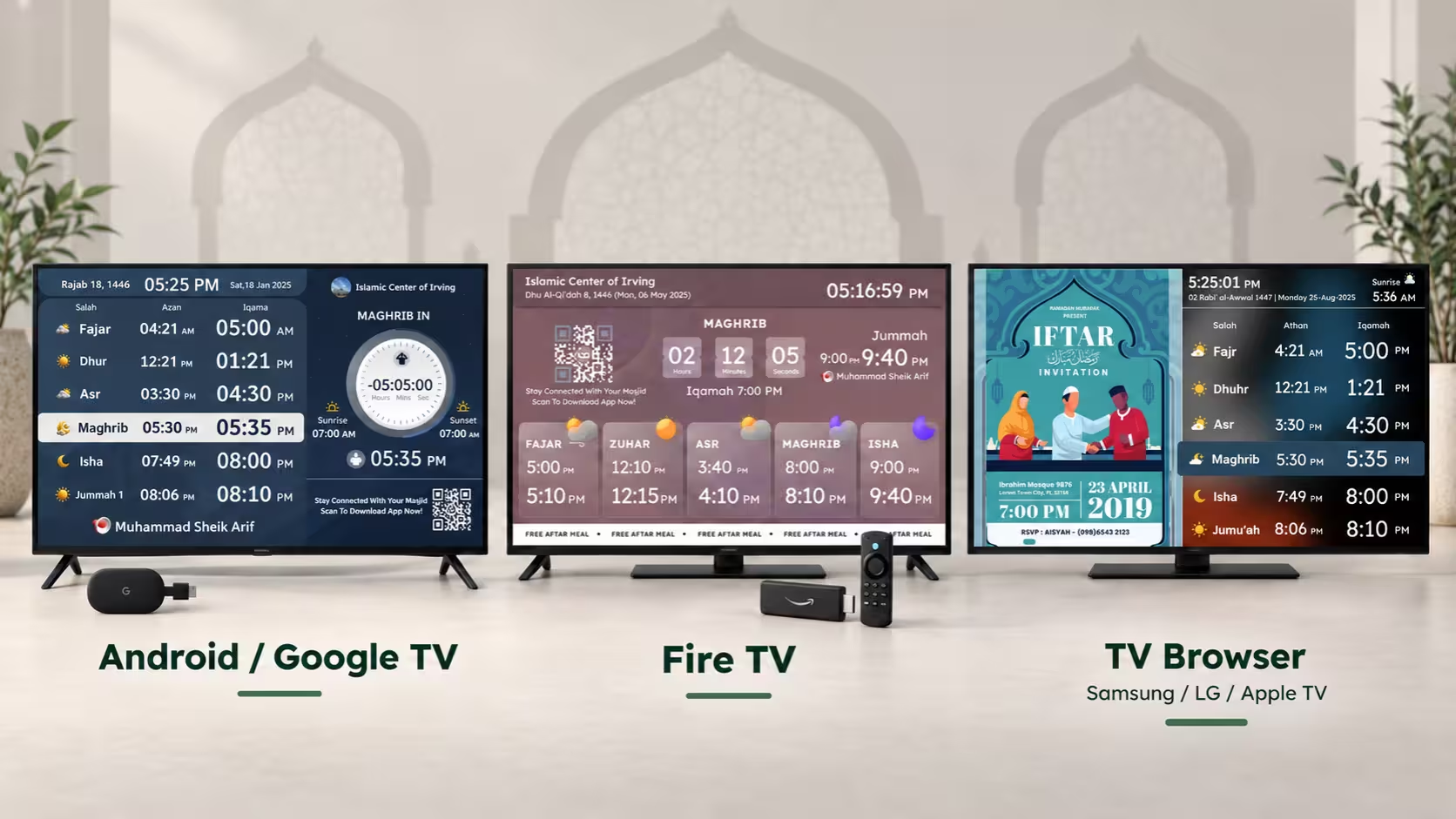
Many mosque display software platforms work with Smart TVs, Android TV, Google TV, or Amazon Fire TV devices. Some also support TV browsers.

If you're using ConnectMazjid, you can install its TV app on a supported device or open cmzapp.com/tv in a compatible TV browser.

You won't need to purchase a separate media player if your existing TV supports the software.

Before moving ahead, check that the TV connects to the internet and that its screen is clearly visible from the prayer area.

Checking a Smart TV and internet connection before installing mosque display software

Step2Step 2: Create Your Masjid's Admin Account

Next, you'll need a place to manage your information.

Most mosque display software includes an online dashboard where administrators can control prayer schedules and screen content.

For ConnectMazjid:

  1. Visit portal.cmzapp.com.
  2. Create your masjid's account.
  3. Add your masjid's basic information and location.
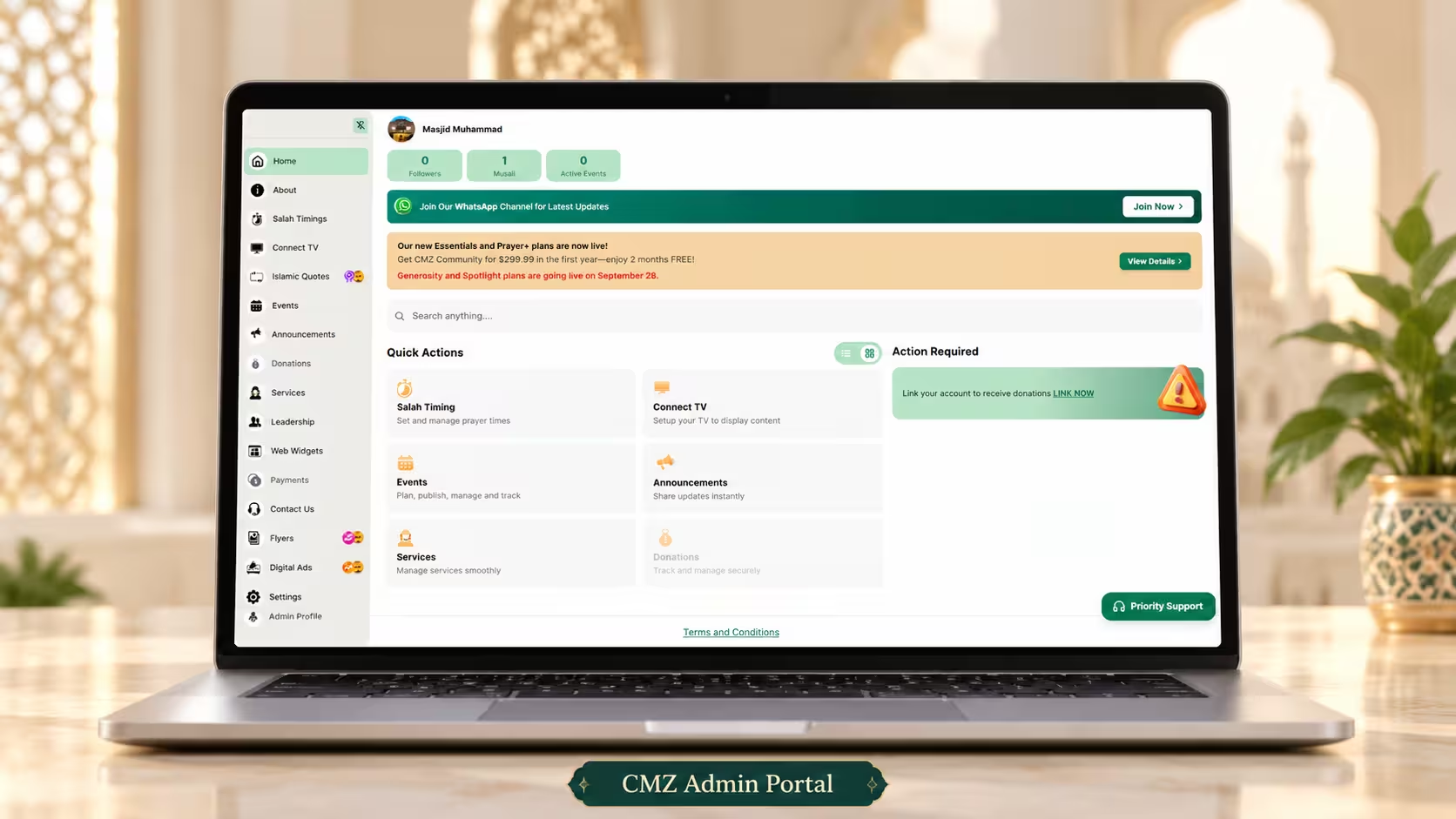
  4. Open the Admin Portal to configure your settings.

Use an email address that your masjid committee can access rather than relying entirely on one volunteer's personal account.

This makes future administration easier when responsibilities change.

Creating a masjid admin account on the ConnectMazjid Admin Portal

Step3Step 3: Add Your Salah and Iqamah Timings

This is the most important part of your setup.

Before displaying anything, make sure your prayer schedule matches the timings approved by your masjid.

Your mosque display software should let you manage Athan and Iqamah separately.

With CMZ, you can configure your calculation method, Asr preference, and Iqamah timings. You can also upload an existing annual timetable using a supported spreadsheet format.

Don't forget to check:

  • Fajr, Dhuhr, Asr, Maghrib, and Isha timings
  • Jumu'ah Salah and khutbah schedules
  • Your preferred 12-hour or 24-hour format
  • Seasonal Iqamah changes

Once you've saved your timings, review a few dates to make sure everything matches your masjid's schedule.

Adding Salah and Iqamah timings in the mosque display software dashboard

Step4Step 4: Connect Your TV to the Admin Portal

Now you're ready to connect the screen.

With ConnectMazjid, the process is straightforward.

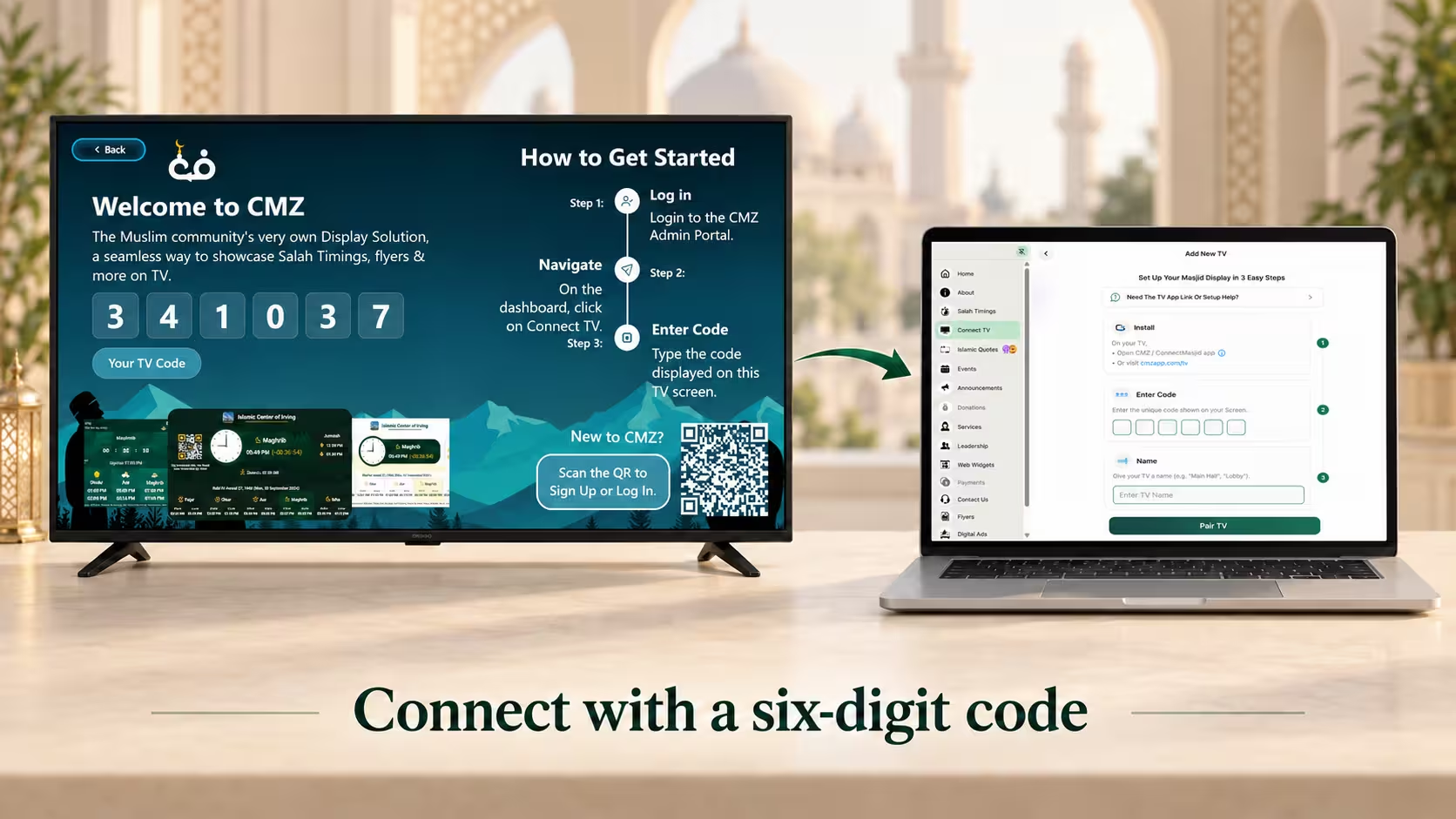
  1. Open the CMZ TV app or supported TV browser page.
  2. A six-digit pairing code will appear on your TV.
  3. Open Connect TV in your CMZ Admin Portal.
  4. Enter the code and give your screen a name, such as Main Prayer Hall.
  5. Complete pairing to connect the display.

Your TV can now receive the information you've configured.

If your masjid uses several TVs, you can connect them to the same portal and manage their settings individually.

Pairing a mosque TV with the Admin Portal using a six-digit code

Step5Step 5: Choose Your Layout and Start Displaying

Your mosque display software is connected. Now make sure people can actually read what's on the screen.

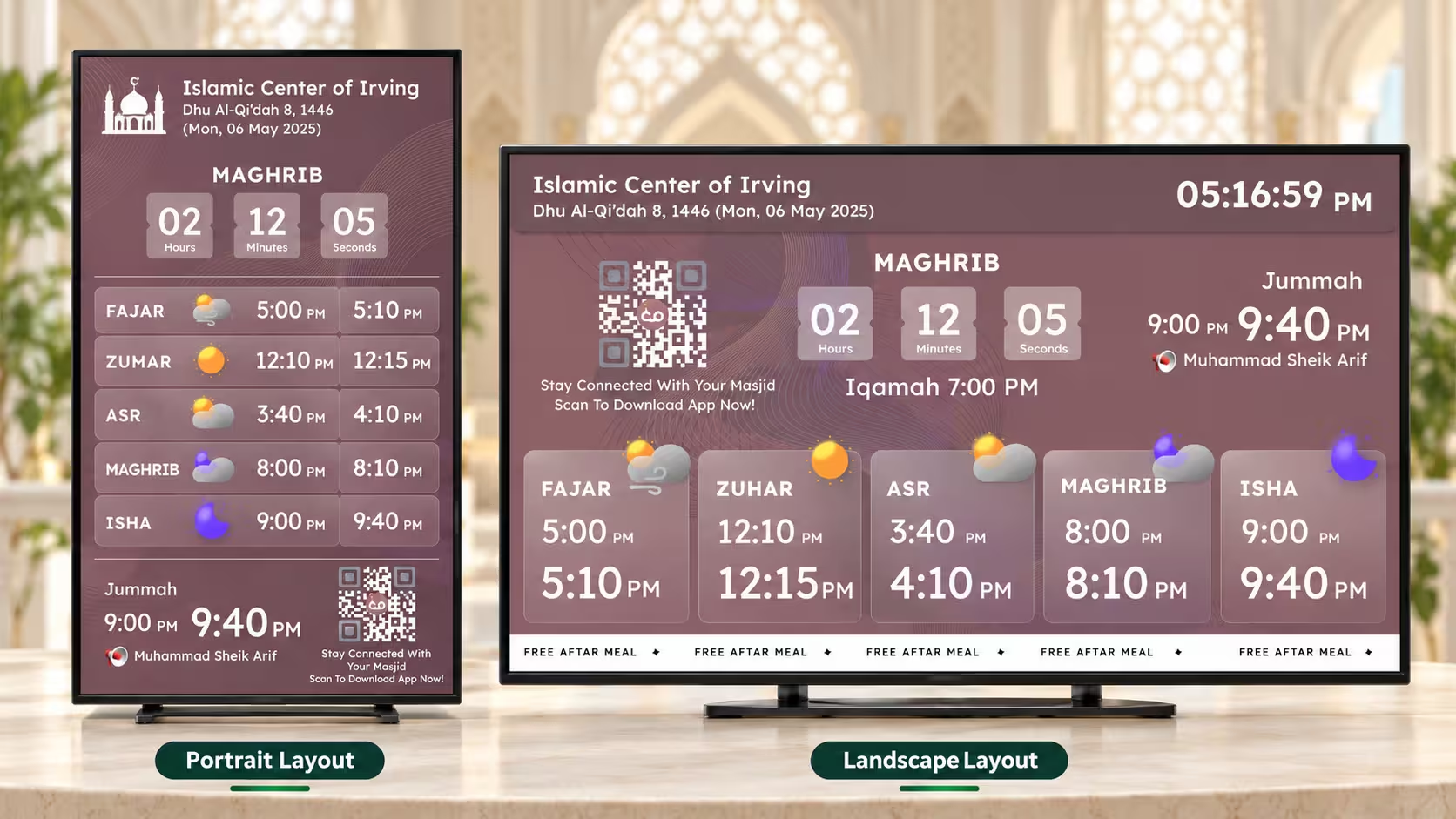
Choose a layout that suits the screen's position.

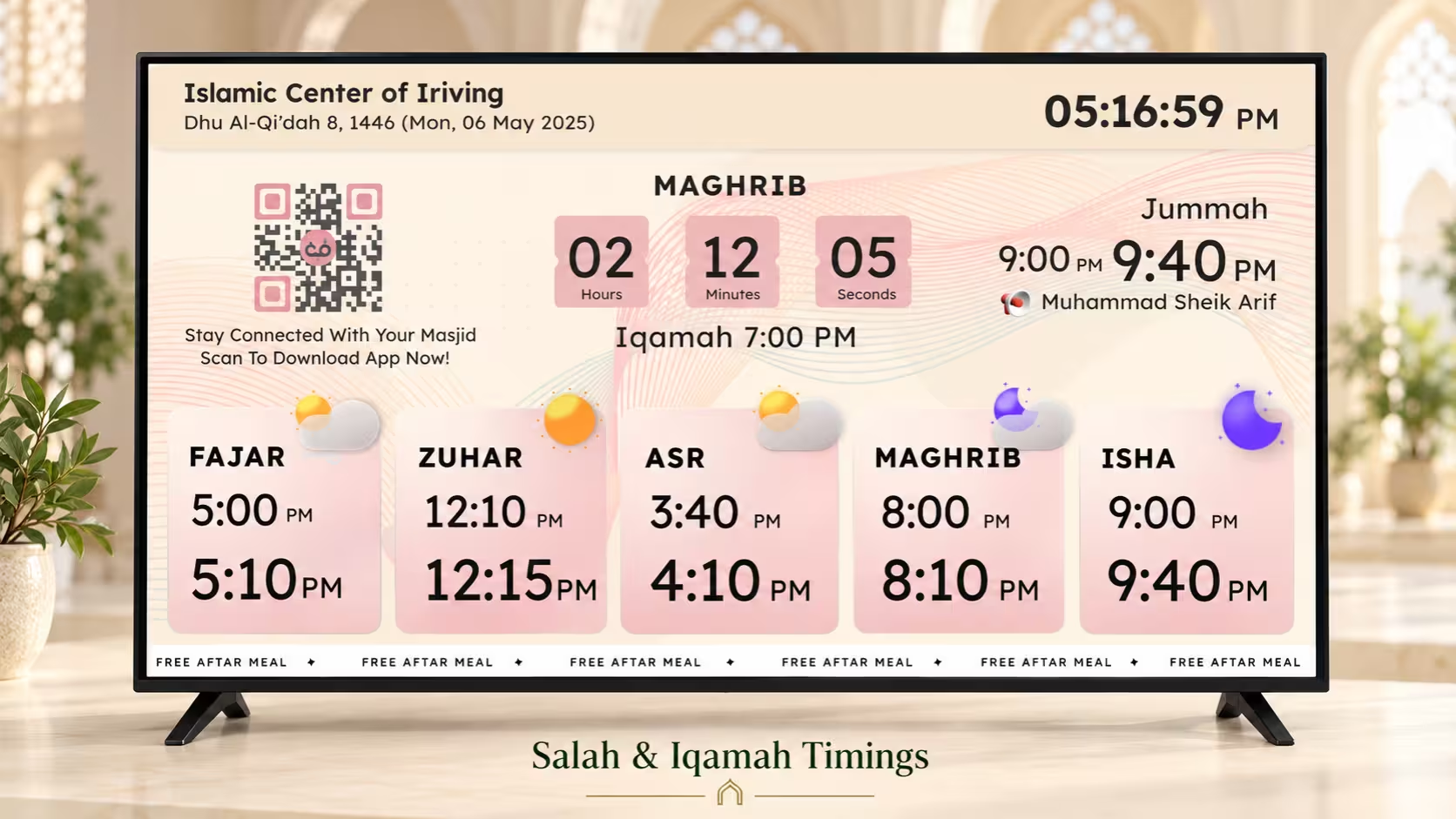
A landscape TV in the main prayer hall may need large prayer timings and a visible countdown. A portrait screen near the entrance might need more space for announcements.

With CMZ, you can choose different display themes, adjust branding, and select content such as events, flyers, and community notices.

Before finishing, stand at the back of the prayer hall and check whether the timings are readable.

Also, make one small test update in the Admin Portal to confirm it appears correctly on your TV.

Choosing a display layout and theme for the mosque prayer hall TV

Want to see the available display layouts? Explore ConnectMazjid's TV Display options before choosing your screen design.

Explore TV Display options

What Can You Manage After Setup?

Once your mosque display software is running, you can manage more than a digital prayer clock.

ConnectMazjid offers additional features such as:

Iqamah change reminders

Inform people about upcoming prayer-time changes.

Prayer blackout

Darken the screen during Salah.

Prohibited Salah timing alerts

Show reminders around sunrise, zawal, and sunset.

Events and announcements

Display activities and important community notices.

Multiple-screen management

Control displays from one Admin Portal.

Some advanced features require a paid plan, so check what's included before enabling them.

The advantage of having one dashboard is that your volunteers can make routine changes without going to each TV.

FAQ

Frequently Asked Questions

1. Is mosque display software free?

Some platforms offer free plans. ConnectMazjid includes standard prayer-time displays in its free Core plan, with optional paid features.

2. Can I use mosque display software without buying a new TV?

Yes, if your current Smart TV supports the software. Older TVs may need a compatible streaming device.

3. Do I need technical knowledge to set up the display?

Not necessarily. With CMZ, you create an account, configure your timings, and pair your TV using a six-digit code.

4. Can I update prayer times remotely?

Yes. With a cloud-based system like CMZ, you can change the schedule through the Admin Portal, and connected screens receive the updates.

5. Will my mosque screen work without internet?

CMZ supports offline viewing of previously loaded information. However, you need an internet connection to receive new updates.

Ready to Set Up Your Masjid Display?

Getting started with mosque display software doesn't have to mean buying new equipment or learning a complicated system.

Start with your existing TV, set the correct prayer timings, connect your display, and choose a layout that works for your masjid.

If you're ready to try it, create your free ConnectMazjid account and get your first mosque screen running.

{"@context":"https://schema.org","@type":"FAQPage","mainEntity":[ {"@type":"Question","name":"Is mosque display software free?","acceptedAnswer":{"@type":"Answer","text":"Some platforms offer free plans. ConnectMazjid includes standard prayer-time displays in its free Core plan, with optional paid features."}}, {"@type":"Question","name":"Can I use mosque display software without buying a new TV?","acceptedAnswer":{"@type":"Answer","text":"Yes, if your current Smart TV supports the software. Older TVs may need a compatible streaming device."}}, {"@type":"Question","name":"Do I need technical knowledge to set up the display?","acceptedAnswer":{"@type":"Answer","text":"Not necessarily. With CMZ, you create an account, configure your timings, and pair your TV using a six-digit code."}}, {"@type":"Question","name":"Can I update prayer times remotely?","acceptedAnswer":{"@type":"Answer","text":"Yes. With a cloud-based system like CMZ, you can change the schedule through the Admin Portal, and connected screens receive the updates."}}, {"@type":"Question","name":"Will my mosque screen work without internet?","acceptedAnswer":{"@type":"Answer","text":"CMZ supports offline viewing of previously loaded information. However, you need an internet connection to receive new updates."}} ]}
Scroll to Top